Steam has just posted their year in review for last year, which also includes talking about some developmental plans for this year, largely going over three distinct categories. - Hardware, shopping experience, and tools.
Full post down below.
Quote From Steam Every year our team publishes the Steam Year in Review, a platform-level summary for developers to learn about all the new features, tools, and improvements we shipped. In 2025, we shared ambitious new hardware plans and created a range of new tools to help game developers make their players happy. Feedback from the game developers and publishers who release and operate their games on Steam is a major part of our process for prioritizing our efforts. As always, anyone who has feedback about these new features, or who want to suggest ideas or priorities for 2026, should reach out any time via Steamworks, or at in-person industry events throughout the year.
We’re breaking our 2025 efforts into three different categories:
1. Hardware. We have constantly improved the player experience on existing hardware via updates to Steam Deck and SteamVR, and in November 2025 we announced three new hardware products.2. Shopping and Discoverability. Steam gives players innovative and useful ways to find their next favorite game. Many of our biggest updates and improvements last year focused on the player experience of finding and buying games.
3. Tools & Data. Our team shipped several new ways to let developers more easily manage their presence on Steam, and to more easily access data about their products and performance.
Section 1: Hardware
OK, we know that this is technically the 2025 Year in Review. But to make sense of our hardware efforts we need to go all the way back to 2013, when we first announced our plans to expand PC gaming into the living room. At that time, developers struggled with Linux compatibility, Valve was still learning about building and shipping physical products, and VR was a distant dream. We couldn’t quite deliver the games library or user experience we were aiming at, even though players told us they were excited about playing PC games on the big screen.
Fast forward to 2025, and we’ve solved a bunch of the hardest problems. The Proton compatibility layer brought thousands of excellent games to Linux and SteamOS at no cost to game developers. Millions of players have helped us refine and perfect the gamepad experience of shopping, playing, and chatting on Steam. Manufacturing learnings from the original Steam Controller, the Steam Link streaming box, the Valve Index, and the Steam Deck all poured into realizing what we dreamed about more than a decade earlier: a gaming-first living room experience, an open platform for customers, and wireless virtual reality headset with its own processing power.
Here’s the lineup of hardware we announced in 2025. We shared recently that there have been challenges with memory and storage shortages, but we will be shipping all three products this year. More updates will be shared as we finalize our plans.
The New Steam Controller
Built for Steam and designed to support your whole Steam library, the newly redesigned Steam Controller is plug and play. Every controller comes with a puck which provides fast, stable wireless connectivity and also serves as charging station. Capacitive touch thumbsticks, two trackpads, high-def rumble, and Grip Sense gyro aiming make the Steam Controller the perfect gamepad for PC gaming—and with Steam Input, developers can build customized templates for Steam Controller and Steam Deck to give their players a great experience out of the box.
The Steam Machine
Thanks to SteamOS and Proton supporting a massive library of games, a beautiful and powerful PC designed for big screen play just made sense. Steam Machine has more than six times the horsepower of Steam Deck, packed into sleek, quiet form factor. And because it’s a PC from Valve, it’s totally open. Install other game stores and launchers, other operating systems, use it for productivity software apps, or just launch straight into Steam and start playing.
The Steam Frame
A lightweight and comfortable headset with its own processing power, the Steam Frame is an amazing wireless VR experience. But because it connects to Steam Machine and other PCs, it’s also a great option for enjoying video games full stop, VR or otherwise.
These three new entries into the Steam Hardware family are making PC gaming even more enjoyable and accessible, and solving interesting problems for game developers—even for games that don’t ship via Steam. Throughout 2025 we released a steady drumbeat of improvements to SteamVR, SteamOS, and Proton, supporting even more games and devices. Deck users enjoyed regular quality of life improvements and UI updates, and a new display-off downloads feature which will also be very useful for Steam Machine. And in an exciting milestone, for the very first time SteamOS was the default operating system on somebody else’s hardware: in May of 2025, our friends at Lenovo released the Legion Go S.
Hardware at Valve has come a very long way since our early efforts more than a decade ago, and the new generation of hardware will open up even more opportunities for PC developers to reach and delight their players.
Section 2: Shopping and Discoverability
Steam is a great tool for players to find and learn about games. A player might open the store to see what’s new, or maybe they’ve already heard about a game from a friend and want to check it out. In 2025, we shipped several features and improvements to the shopping and discoverability experience on Steam. Some are focused on finding games that might be interesting, and others are focused on learning more about games in order to make a purchase or play decision.
FINDING GAMES
Lots of game discoverability on Steam happens automatically: through organic recommendations and dynamic featuring based on player’s preferences and history on Steam. Other game discoverability is driven by curated marketing: games meeting certain criteria or coordinating directly with Valve to feature special events or discounts. Still more discoverability is built around customer agency, with tools designed to let a customer dig into the catalog in their own way. We shipped new tools and improvements for all those alternatives in 2025.
Daily Deals
In February 2025, we rolled out a major expansion to our Daily Deal tool. The Daily Deal spotlights are a part of our Discounts & Events carousel on Steam’s front page. We expanded the number of featured spots so that even more games and studios could benefit, and we also built a new “promotion recap” report and history page to help devs track the results of their daily deals. And that doesn’t include the hundreds of additional games that get exposure via developer showcases and themed events we promote in that space.
So, what does that mean in terms of revenue for developers? Because of the improvements to how games are dynamically filtered and recommended to customers, overall Daily Deal revenue dramatically increased by 274% with only a slight drop of -8% in median revenue per Daily Deal. We did expect some drop in median revenue as a result of going deeper into the catalog and promoting a wider range of games, but the net positive benefits significantly exceeded our expectations, with more developers earning much more revenue.
Update News Pop-Up Messages
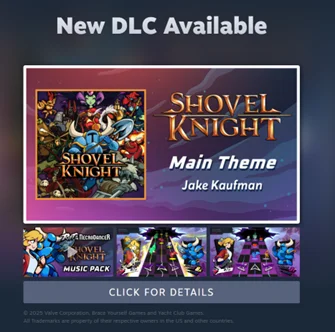
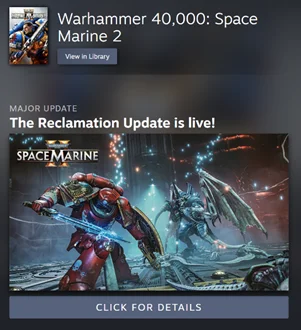
Another way we highlight interesting games and events to players is the Update News window that players see when they launch the Steam client. On the upside, those messages are a great way for users to find out about DLC for their game, a special promo, or an exciting new release. On the downside, players are unlikely to look at more than the first few messages — and in some cases those messages haven’t had enough content or context. In 2025, we started filtering the number of messages a player would see down to a more relevant and targeted subset. We also overhauled the display to pull in more valuable context about the product. The two examples below show off these improvements: players can see screenshots and trailers for a new product like Shovel Knight’s DLC, or get a direct link to a developer’s Steam Event announcement about new content like Space Marine 2’s Reclamation Update.
Monthly Top New Releases
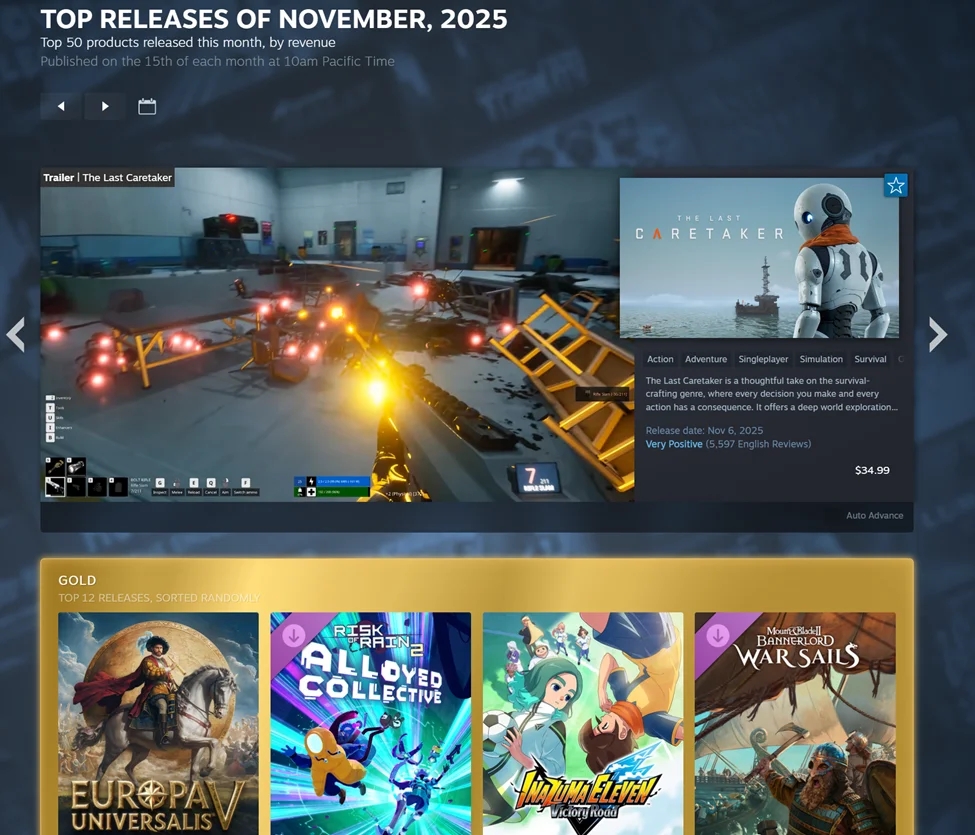
We updated our Monthly Top New Releases page in Steam Charts, a common way for players and devs to see the variety of successful new games. The pages now expand to the top 50 products each month, rather than just 20, with a layout better suited to shopping.
Themed Sale Events
Nearly every month of 2025 hosted at least one major Valve-organized sale event themed around a particular genre or gameplay mechanic. These themed sale events are scheduled out months in advance and help to surface different niches and subcategories of games to the broader Steam audience, and we’re running even more of them based on the positive reception from devs and players. In addition to generating sales and visibility, fests have become useful marketing beats for upcoming products—for instance, a developer might roll out a playtest for their upcoming arcade hockey game during the Steam Sports Festival.
Organic Recommendations
Organic discoverability is a constant focus for game developers and for the Steam team. The store has a variety of useful ways to intelligently surface games based on different inputs. There’s no One Algorithm To Rule Them All that developers need worry about or optimize around—instead, there are several common-sense heuristics we use in different contexts. That way, even if a game isn’t a global top seller or a new release, we still recommend it to relevant players. And because those discovery tools are labeled and transparent, players and devs alike can see what factors into a particular recommendation.
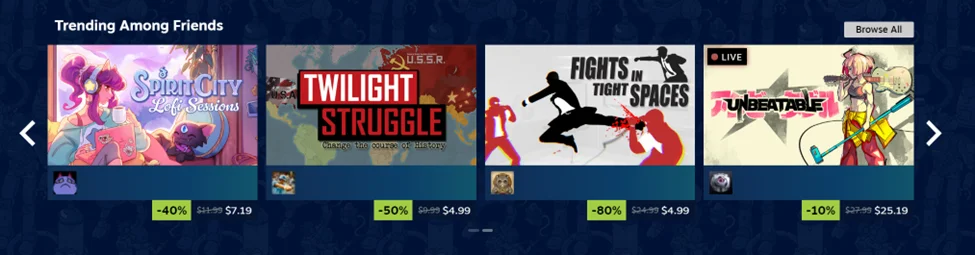
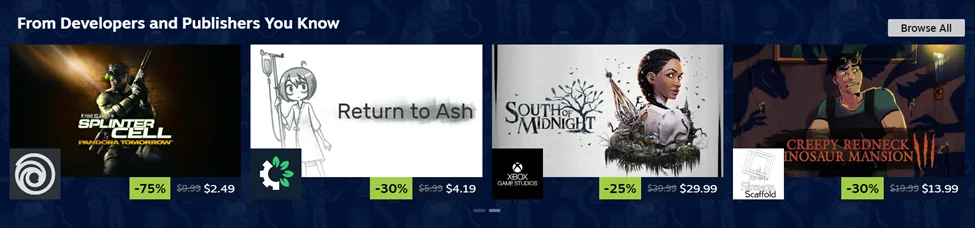
Here’s an example from the 2025 Winter Sale front page, where even in the biggest shopping moments of the year, a player can find relevant and tailored recommendations.
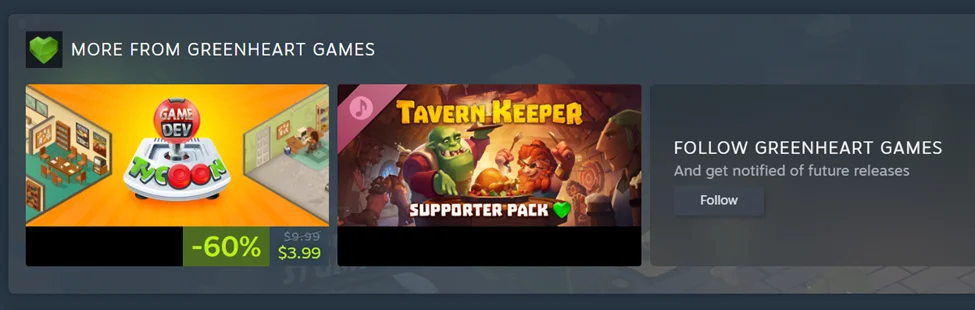
In that first section above, the player sees games recommended purely based on what their friends are doing on Steam. In the second, the player sees games from the studios they have “followed,” even if those games might not be current top sellers or highly relevant based on tag or genre data. Players can follow specific curators, game studios, franchises, and publishers, allowing Steam to proactively recommend games from those entities in other places across the store, like so:
In 2025, we released some major improvements to how developers can create and manage those pages, which feeds into discoverability—but we’ll save those nitty-gritty details for the “Tools & Data” section below.
Discovery Queue Overhaul
The Discovery Queue is exactly what it sounds like, and it has existed on Steam for many years. But in 2025 we built a faster, cleaner UI for players to cycle through the games in their queue smoothly. Do your friends play this game? Is it similar to something else you’ve enjoyed? Is it on your wishlist? The Steam store pulls in all those data points and more when making organic suggestions to players. And because we show those variables directly to a player as they navigate the queue, we can better contextualize recommendations to give them more heft.
Personal Calendar
Even the most dedicated player would have a hard time keeping track of all the great games coming out on Steam, and it’s nearly impossible for somebody to remember the release date of that neat game they saw in a showcase or tried out in a Next Fest three months earlier. Enter the Steam Personal Calendar: a Steam Labs experiment showcasing upcoming and recent releases. As with most Steam features, the baseline Calendar view works very well, but these new toggles and sliders allow users to tweak the display and personalize their preferences.
The Community Recommends
One of the most unique sections on the Steam front page is “The Community Recommends.” Valve doesn’t have an editorial staff picking favorites or selling ad space to decide what products get visibility—instead, that’s driven by how customers spend their time and money. As a result, we’re free to take a more creative approach with features like The Community Recommends: showcasing games based on positive recommendations from players in the community. We apply some smart filtering to find reviews that are relevant and helpful, then showcase the respective game alongside the review. Players who like shopping this way can dig deeper into The Community Recommends, with filters and options around language, tag, playtime, and so on. 2025 saw a major upgrade to the machine learning flow used to identify information-dense reviews to make better recommendations.
Search and Layout
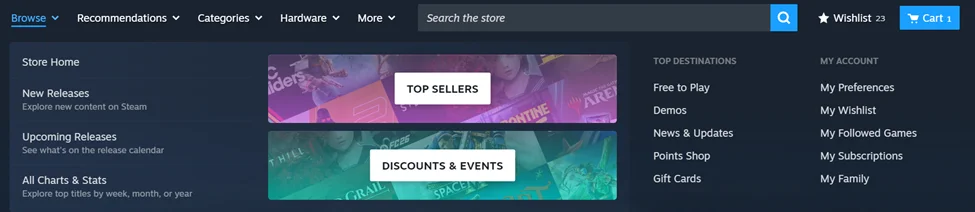
In July 2025 we shipped a beta for a new navigation bar and search experience. Major destinations across the store became easier to find, and all the recommendation tools were organized into a single tab for users who were actively in a shopping and discovery mindset. Running this sort of overhaul through an opt-in beta generates qualitative and quantitative feedback for our team so we can fix bugs and improve the user experience. The updated store menu shipped out to all users in September 2025.
The challenge of discoverability is constantly evolving—especially as the store grows to support so many more games and players with disparate wants and expectations. We introduce new shopping tools and update the existing ones, and we know players are going to gravitate towards discovery mechanisms that fit their needs. One player might just load up the top sellers and scan the hits, another might take a deep dive into the Interactive Recommender, and a third might glance at their Friends List to decide what to play next. Our goal is to give players the right tools and information to find their next favorite game.
Speaking of tools and information… discovery is only the first step.
LEARNING ABOUT GAMES
It’s important for players to have quick and efficient access to the information they need to make a purchase or play decision. In 2025 we spent a lot of time and energy helping players learn about the games they just discovered.
Accessibility Features
Accessibility on Steam has been greatly overhauled. If a game supports accessibility features like color alternatives, touch-only input, or text-to-speech, developers can now highlight those features and customers can search or filter for games accordingly. We also provided a guide so devs can better understand how and why to consider these options. Players were excited about these improvements when we first introduced them in June 2025, and just a few weeks ago we added even more fine-tuning based on feedback from users and devs.
Wide Store
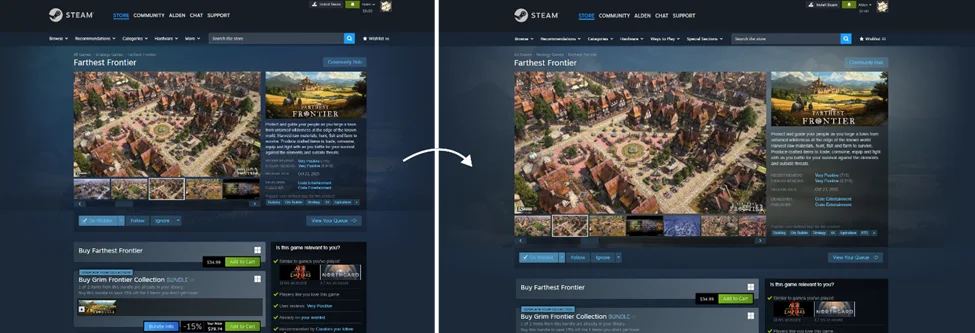
Another major shift was to the overall store page layout. Paired with the new navigation bar and search improvements mentioned above, we rolled out what we lovingly nicknamed “Wide Store”, making better use of screen real estate when browsing games.
Wide Store enables developers to provide higher-quality images in their game descriptions, and adds Theater and Full Screen options for clicking through screenshots and watching trailers.
Trailer Player
Speaking of trailers, the video player itself got a major upgrade. Trailers are an invaluable source of information for prospective players—often among the first things a user jumps to when checking out a new game. The new overhaul solves a few big problems: it uses less bandwidth, allows for easier scrubbing and seeking, and features an adaptable UI that looks and feels great across Steam Deck, the Steam mobile app, laptops, and widescreen monitors. Re-encoding more than 400,000 trailers across every product on Steam was a resource-intensive process, but the result is a dramatically better trailer viewing experience for all users on Steam.
User Reviews By Language
Steam Reviews provide an enormous amount of transparency and data to players, and a motivated user can dig deep into huge quantities of granular and useful feedback. But we heard suggestions from both customers and developers that seeing a more tailored or relevant top-line user review score would be helpful. So we looked into it, and found many cases where user review score varied significantly from one language to the next. After some initial exploration and testing, we landed on a solution: For games that have at least 2,000 publicly visible user reviews and at least 200 reviews in a single language, we now break out language-specific user reviews, and calculate a language-specific overall review score. This was a big project, and it went through a great deal of iteration and testing in an attempt to accurately reflect user sentiment and relevant info about a game. Check out the full announcement for more details.
Bundle Landing Pages
While deciding which game to buy is very important, figuring out which edition or bundle to buy is also a big decision! Our 2024 Year In Review highlighted some of the features we released to better display options like Advanced Access and special editions, and to manage the cart checkout flow. We continued that work in 2025 with a new Bundle Landing Page for games, auto-generating a list of every bundle that includes a particular game. That way, if a studio wants to do collaborative bundles with friendly studios or genre-overlapping games, users can see all of those options in one place. We also added a new “Pinned Bundle” option so that developers can manually highlight a particular offer to potential players.
Available At A Lower Price Message
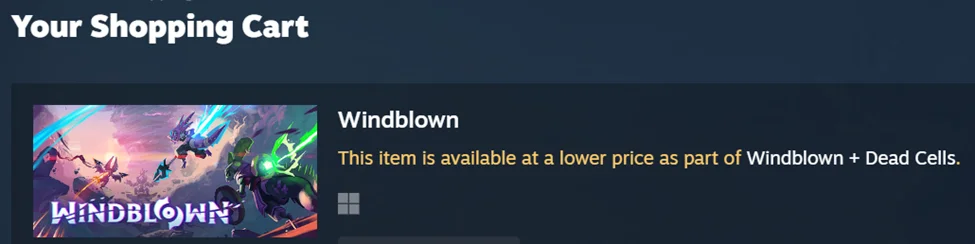
We also now let players know, when they add a game to their cart or start a checkout process, if that game is available to them at a lower price via a Complete-the-Set bundle. For example, a user who already owns Dead Cells and wants to buy Windblown will be notified about a better price via an available Complete-the-Set bundle, even if they never saw or clicked on the bundle option to begin with.
Our goal is that small improvements like this will build trust with customers and provide a better shopping experience, which in turn helps developers find their audience on Steam and ultimately sell more copies of their games. But helping players find and buy the right games is just one part of the puzzle—we also continually invest in developer features to help game studios make product and marketing decisions with better tools and data.
Section 3: Tools & Data
Many of the new developer tools we released this year go hand in hand with the shopping improvements listed above. We’ll focus on those first, and then transition to the 2025 improvements that help developers get more information about their products and sales performance.
Art Asset Templates
In January, we released a new set of templates and preview tools for store page assets. We owe a hat tip to Nick Pfisterer of Polymoon Games, who built a custom tool for previewing how art would show up on a game page. It was such a nice improvement that we worked with Nick to integrate his work into Steam and make it freely available to all developers. You can grab it (along with our asset templates) here.
What You See Is What You Get
In June, we made a big push around editing and managing store pages. The first update was a What-You-See-Is-What-You-Get visual editor for Steam Events, letting devs see exactly what blog posts will look like while they are actively editing them. This was paired with new options for uploading images and support for pasting in formatted text and other content directly from popular writing tools. These Steam Events really matter: during the 12 months of 2025, developers posted 436,592 Steam Events, resulting in 3.13 billion player views.
Image Uploading and Management
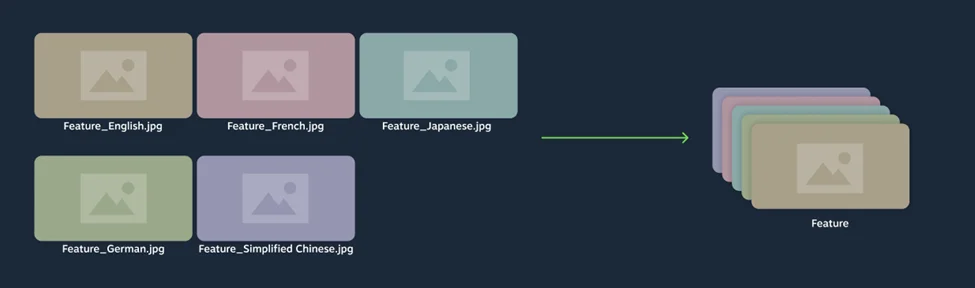
We also rolled out a series of improvements to image uploading and management, which was especially helpful and time-saving for localized images.
That set of updates enabled alt-text for all images, a popular Accessibility request from both developers and players.
Artwork Overrides
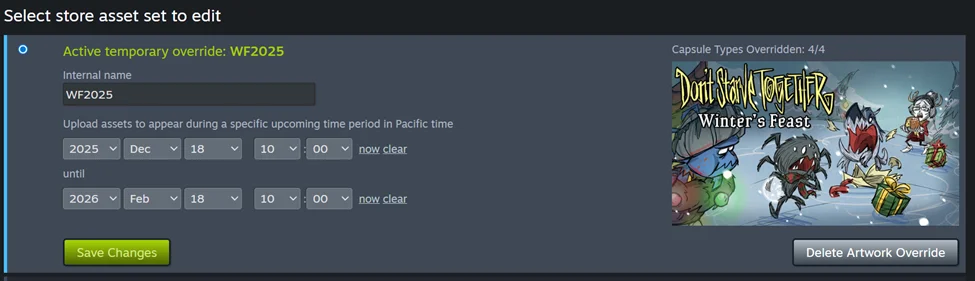
Artwork Overrides are one of the ways developers can market a new update or in-game event in their capsule artwork. As part of the other store page and image management updates, we added new UI and functionality for creating and managing alternate capsule art.
Developer and Publisher Homepages
We also released some major improvements to the Developer & Publisher homepage feature. Our May update to homepages made it significantly easier to connect games to a homepage right from the Edit Store Page tools. We also now link to the homepages of developers and publishers of games from the shopping cart, making it easier for players to follow their favorite studios and get notified about future releases. (And while it technically shipped in 2026, we wanted to plug the big customization visual overhaul for homepages, which released right before we published this Year in Review post!)
Steam Playtest Improvements
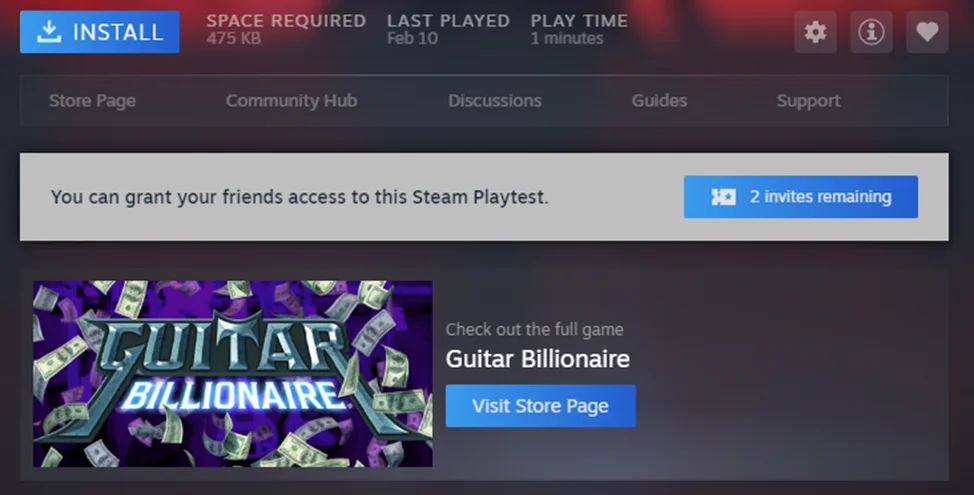
Steam Playtest tools got a big upgrade to help manage and expand a playtest user base. Steam Playtest first shipped back in 2020, but in the years since we have continued adding features and expanding options based on developer feedback. Developers told us that in some cases they needed to wipe the current set of playtesters to start fresh with a new beta, so that option is now available on all Steam Playtests by ‘resetting’ a Steam Playtest. But the biggest update in 2025 was adding Friend Invites to playtests, so that an existing playtester can recruit friends to join.
DATA & REPORTING
Sales Data API
The first and most significant update was to introduce a new Sales Data API, allowing developers to programmatically retrieve revenue, units, key activations, wishlists, and more. All this data was already accessible, but the API makes it much easier for studios to dig into specific topics like regional breakdowns or refunds over time to inform decision-making and planning.
This API also exposes some new data: per-batch Steam key activation figures. To explain the significance of this requires some background on Steam keys. We provide free Steam keys that publishers can use for testing, press, QA, and so on—and also to sell on other stores without paying Valve any royalties or fees.
Developers request Steam keys in batches and can apply a tag to each request. Data about user activation of keys has always been available by tag and by country, but now every Steam key request has its own “key_request_id”; calls to the GetDetailedSales API allow for viewing activation data grouped by that ID. That way, a publisher has even more data about what is happening to their Steam keys (in addition to all the other available details about sales, revenue, bundles, and microtransactions.)
Per-Discount Revenue Reporting
We also rolled out a new form of per-discount revenue reporting to show off units, discount percentage, discount length, total revenue, revenue per day, and even the number of times that same discount percentage has run. This at-a-glance display gives developers useful information in a digestible format to help with future discount decisions or forecasting.
The discount history display even links out to the full Revenue Details in our sales data reporting site, and the Traffic Details which show store page impressions and visits, giving game devs enormous transparency and insight to how their game is performing across Steam.
In Game Performance Monitor
Finally, we shipped a new in-game performance monitor, with a deep set of data points on CPU and GPU performance, RAM, frames per second, and more. We approached this project with the dual perspective of game players and game developers in mind, allowing the performance monitor to be a valuable tool for a studio working on debugging and optimizations, as well as to a player trying to get the best gameplay experience out of their hardware.
IN CONCLUSION
The work we shipped in 2025 continues a long trend of iterating on existing systems and introducing new ones to make Steam better. Ideas like the Discovery Queue, Developer homepages, or Steam Playtest start as small beta features and continue to improve years later based on customer use cases and developer requests. That iterative approach focused on meeting the needs of developers and players has led to consistent long term growth, and the opportunity on Steam is bigger than ever.
Five years ago, Steam was growing steadily and crossed the 25 million concurrent user mark for the first time. In the years since, we’ve grown at a pace of around 3.4 million additional concurrent users per year, reaching 42 million peak concurrent users.
All those users are downloading a lot of content. In 2024 we delivered about 80 exabytes to customers, and in 2025 that grew to 100 exabytes. It's hard to make sense of such a huge number, but just for fun: Steam users are averaging 274 petabytes of installs and updates per day- that's 11.42 petabytes per hour, which is about 190,000 GB of data per minute.
That user growth translates to more revenue for game developers. Since the 2018 announcement of the 75% and 80% revenue share tiers, more and more games from developers big and small have reached new higher revenue share. The revenue share paid out across all non-Valve games on Steam in 2025 was 76%, and that does not include any revenue developers may earn selling free Steam keys outside of Steam. Back in 2024, we shipped a new notification feature for developers to make it more clear when their game has crossed a new revenue share tier, and developers can see a game’s progress towards those higher tiers in their sales reporting.
Our team will keep working on new tools and features to help PC game developers reach and delight their players. Just as we mentioned in the introduction, our priorities are guided by feedback from game developers and customers. Reach out to us any time to share suggestions or requests-- those ideas might turn up in the future 2026 Year In Review!
Thanks,
The Steam Team



What do you think of Steam's improvements last year and how excited are you for this year? Let us know your thoughts in the comments below.
Comments
No comments yet
Be the first to share your thoughts!