
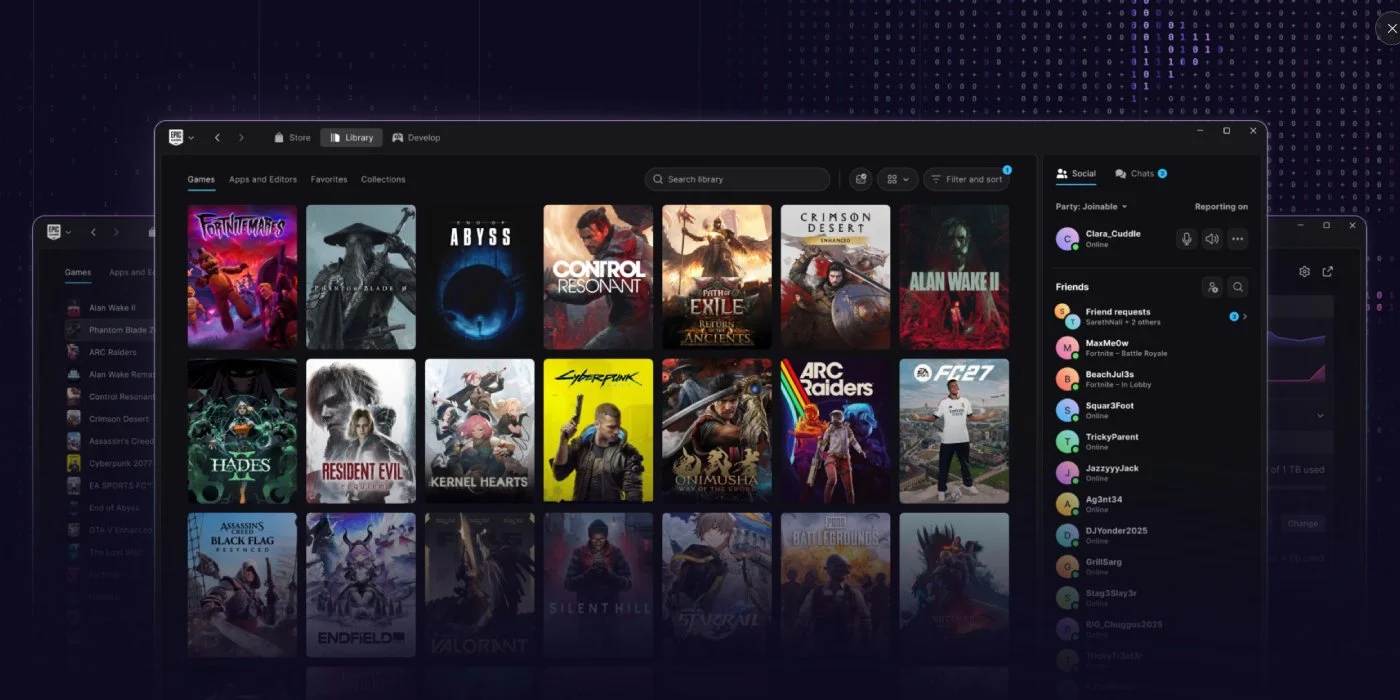
Epic's new Store is now available in preview, and it's quite an upgrade! The store already moves a lot faster than the old one, and the games library is better organized than before, giving each game its own page.
The Store is available in a Preview for Mac, Windows and, in a nice development, on Linux, meaning you'll be able to install the launcher on your Steam Deck!
According to the official blog post (linked below), the new launcher has been entirely vibe coded because "programming is hard". How much of that is true, and how much the writer of the blog trying to be hip and funny, I do not know.
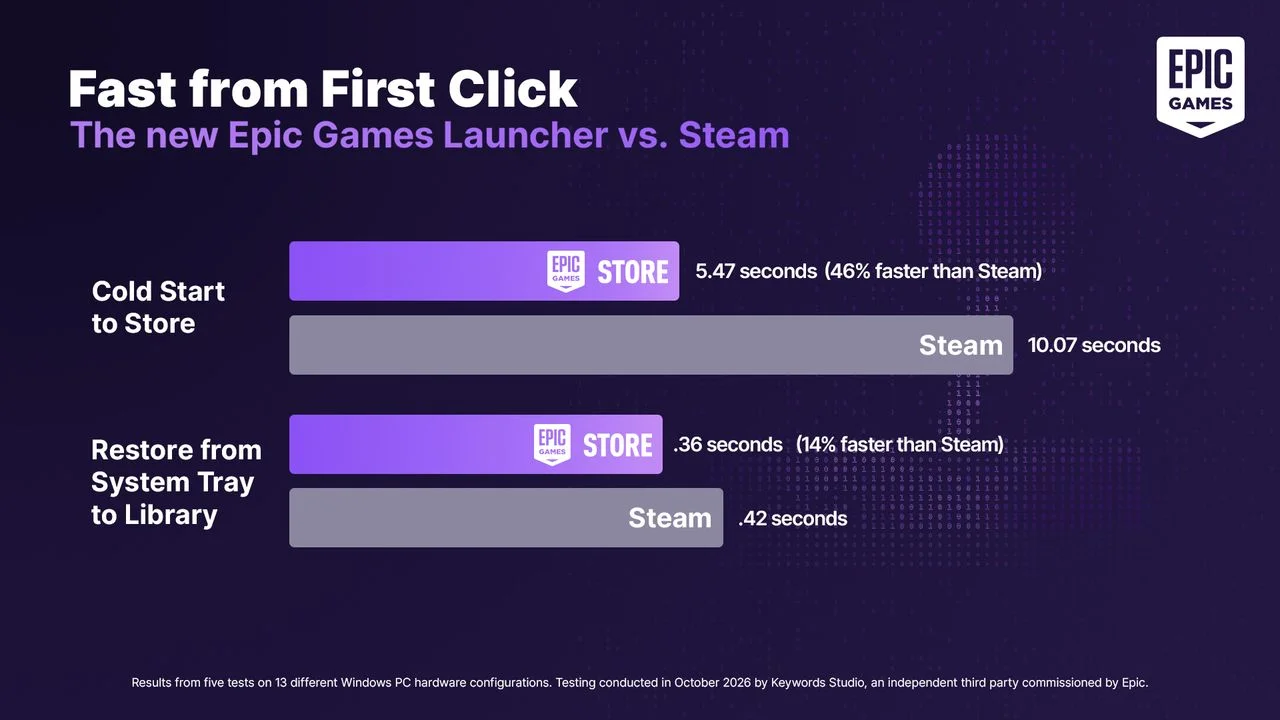
The launcher boasts a 46% faster start-up speed compared, and a 14% speed increase in getting from the System Tray to the Library (though launchers both are under 1 second in that last one, so who cares?).
The more interesting part is their commitment to rewriting Easy Anti Cheat for Linux to have parity with the Windows version. Fortnite is going to be the first new game to benefit from it, with third-party developers having access to it as well.
Programming is hard. So, instead of doing that, we vibe coded a new Epic Games Launcher that’s way faster and more responsive than the current one, and has a new look.
This first release is light on features. Think of it as a speedboat and not a yacht! Though it does have advanced digital commerce technology such as a shopping cart.
You can start testing the new Epic Games Launcher in Preview for Windows, macOS, and, for the first time, Linux (see the FAQ for supported distros).
What's new
Lighter, quicker and connected
- Get to the fun sooner. Faster cold starts, snappier navigation between library and store, and less load on your system while it runs in the background.
Improved library and download experience
- Everything about your game in one view. Select any game to check its status, activity, details, and play controls on a dedicated page. Connect your PC libraries and see everything you own together within the Launcher.
- Customize your experience. Keep collections alongside your library, switch between grid and list views, and customize the top bar with your favorite games and apps.
- Find games faster. Search and filter as you type, with a cleaner layout that makes even large libraries easier to navigate.
- Monitor your downloads. Check download, read, and write speeds, as well as active, queued, scheduled and failed downloads in one place.
How to get started
1. Download the Launcher. Check the system requirements on the Preview website, then grab the installer for your device.
2. Install and sign in. Open the installer, sign in and follow the instructions. Your Epic Games account, purchased games, installed games, cloud saves, and progress are all tied to your account, so they carry over to the Preview as well as the full release.
3. Explore. Browse your library, manage your downloads, customize your Launcher and see what’s new.
You can use the ‘Send Feedback’ button in the Launcher to report an issue.
Note: If you’re a competitive player or a developer working on a live project we recommend using the current Launcher during the Preview.
Fortnite is coming to Linux on the Launcher
To bring Fortnite to Linux, we are rebuilding Easy Anti-Cheat(EAC) and working with distro maintainers on security requirements. Once it’s working with a critical mass of distro maintainers, we’ll bring Fortnite to Linux via the Epic Games Launcher.
We’ll also make these improvements available to other developers so they can bring their games to Linux players. For more info on our work to expand EAC support across Linux, check out the tech blog we published today.
What’s next
The Preview is just the beginning. We’ll be engaging with players as we ship updates, optimizations and new features on the road to the new Launcher’s release.
Have you tried the new Epic Launcher? What did you think of it? Let us know in the comments below!




Leave a Comment