

How to Summon a Mount in World of Warcraft
Learn how to summon a mount in World of Warcraft, set up keybinds, use the random mount button, and fix common reasons your mount won't appear.

To summon a mount in World of Warcraft, open your Collections (press Shift+P), go to the Mounts tab, then right-click any mount you own, or select it and click Summon. You can also drag a mount to your action bar and click it, or use the random favorite mount button. You need to be outdoors, out of combat, and standing still to mount up.
The Quick Way to Summon a Mount
Press Shift+P to open the Mount Journal (this is part of the Collections window).
Click the Mounts tab if it isn't already selected.
Find the mount you want, click it once, then hit the Summon button at the bottom. Or just double-click the mount.
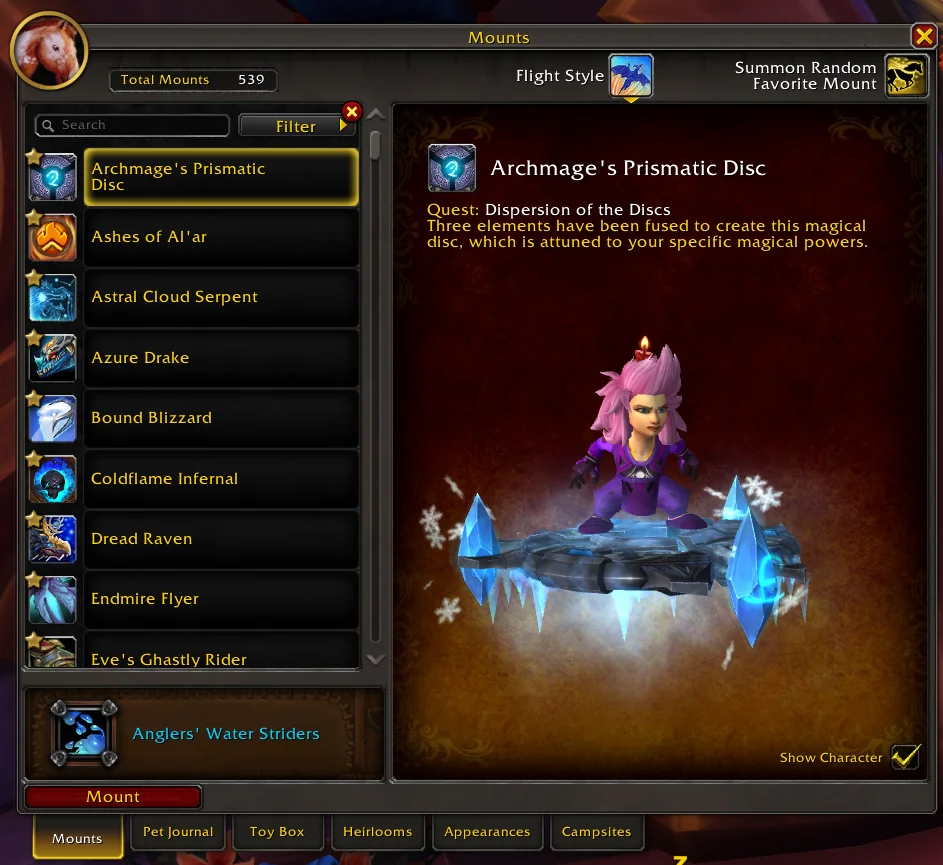
That's the whole thing. The mount appears under you and you ride off. If nothing happens, scroll down to the troubleshooting section below.
Set Up a One-Button Random Mount
Most players don't open the journal every time. Instead, they use the built-in random mount button, which picks a random mount from your favorites and automatically chooses a flying or ground mount based on where you are.
Open the Mount Journal (Shift+P).
Hover over any mounts you like and click the small star icon in the corner to mark them as favorites.
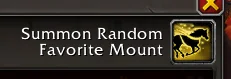
At the top-left of the journal, there's a Summon Random Favorite Mount button (it looks like a paw/horseshoe icon with a question mark). Drag that onto your action bar.
Now click that action bar button, or set a keybind for it, to summon a random favorite mount instantly.
This is the cleanest setup. One key, and the game figures out whether you should be flying or on the ground.
Put a Mount on Your Action Bar
If you want a specific mount on a hotkey instead of a random one:
Open the Mount Journal.
Click and drag the mount's icon straight onto an empty action bar slot.
Click that slot (or bind it) to summon that exact mount.
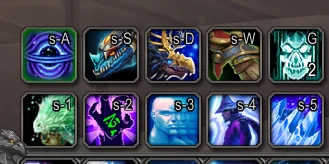
You can fill several action bar slots with different mounts this way if you like swapping between them.
Use a Keybind or Macro
To bind a key to an action bar slot, open the menu (Esc), go to Options > Keybindings, and assign keys to your action bar buttons. Drop your random mount button or a specific mount onto a bar first, then bind that slot.
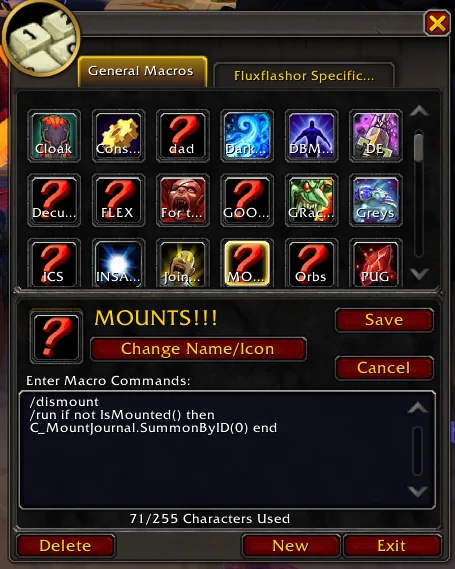
If you want a single macro that mounts when you're standing and dismounts when you're already riding, try this:
/dismount
/run if not IsMounted() then C_MountJournal.SummonByID(0) end
The SummonByID(0) line summons a random favorite mount. Drag this macro to your action bar and bind it like any other button.
Why Your Mount Won't Summon
If you click summon and nothing happens, it's almost always one of these:

You're indoors. You can't mount in most buildings, caves, or instances. Step outside.
You're in combat. Get out of combat first, then mount.
You're moving. You have to stand still (or be moving only forward in some cases). Stop, then summon.
You don't know riding for that mount type. Flying mounts need flying skill, and some areas require Pathfinder or skyriding to be unlocked. Ground mounts always work where mounting is allowed.
You're swimming or falling. Aquatic mounts work in water, but a normal ground mount won't summon while you're submerged.
Low level. You need a certain level and riding skill before you can use mounts at all. Newer characters unlock riding fairly early, but very low levels may not have it yet.
Flying vs Ground vs Dragonriding
The random favorite button is smart about this. In zones where you can fly, it summons a flying mount; in zones where you can't, it gives you a ground mount. In Dragon Isles and other skyriding zones, you can use dynamic flight mounts (dragonriding mounts) that fly with momentum and stamina rather than the old hover style. Many flying mounts now support skyriding, so a single favorite list usually covers everything.
How to Get Your First Mount
If you don't own any mounts yet, you'll find them through:
Mount vendors in your faction's main cities (these sell basic riding mounts once you have the gold and level).
Class-specific options and quest rewards as you level.
Achievements, reputation rewards, dungeon and raid drops, and the in-game store.
Once a mount is added to your collection, it stays there for every character on your account, so you only need to learn each one once.
Quick Recap
Open Collections with Shift+P and click a mount to summon it.
Favorite your best mounts and drag the random favorite button to your bar for one-click summoning.
Bind that button or a macro to a key for instant mounting.
If it won't work, check that you're outdoors, out of combat, and standing still.
About_Author

Robert "Fluxflashor" Veitch is the founder of Out of Games. With over a decade of experience in gaming content, and being done with the exhaustion of corporate nonsense, he wanted to do something different with a focus on the community in this online world that tries so hard to just make everyone just another number. Robert is currently playing whatever interesting game shows up next. He can be contacted via direct messages.
More_World of Warcraft_Guides
What Is Lust in WoW? Bloodlust and Heroism Explained

When Did World of Warcraft Come Out? Full Date Guide

Why Is World of Warcraft Down? Server Status Explained
Latest_World of Warcraft_Guides
What Is Lust in WoW? Bloodlust and Heroism Explained
When Did World of Warcraft Come Out? Full Date Guide
Why Is World of Warcraft Down? Server Status Explained
// join_the_conversation
Sign in to share your thoughts, vote on comments, and connect with the community.
Comments
// no_comments_found
Be the first to share your thoughts!
Leave a Comment