

Why Is Path of Exile 2 Stuttering? Fixes That Work
Path of Exile 2 stuttering is usually shader compilation, asset streaming, or network lag. Here are the real fixes to smooth out frame hitches fast.
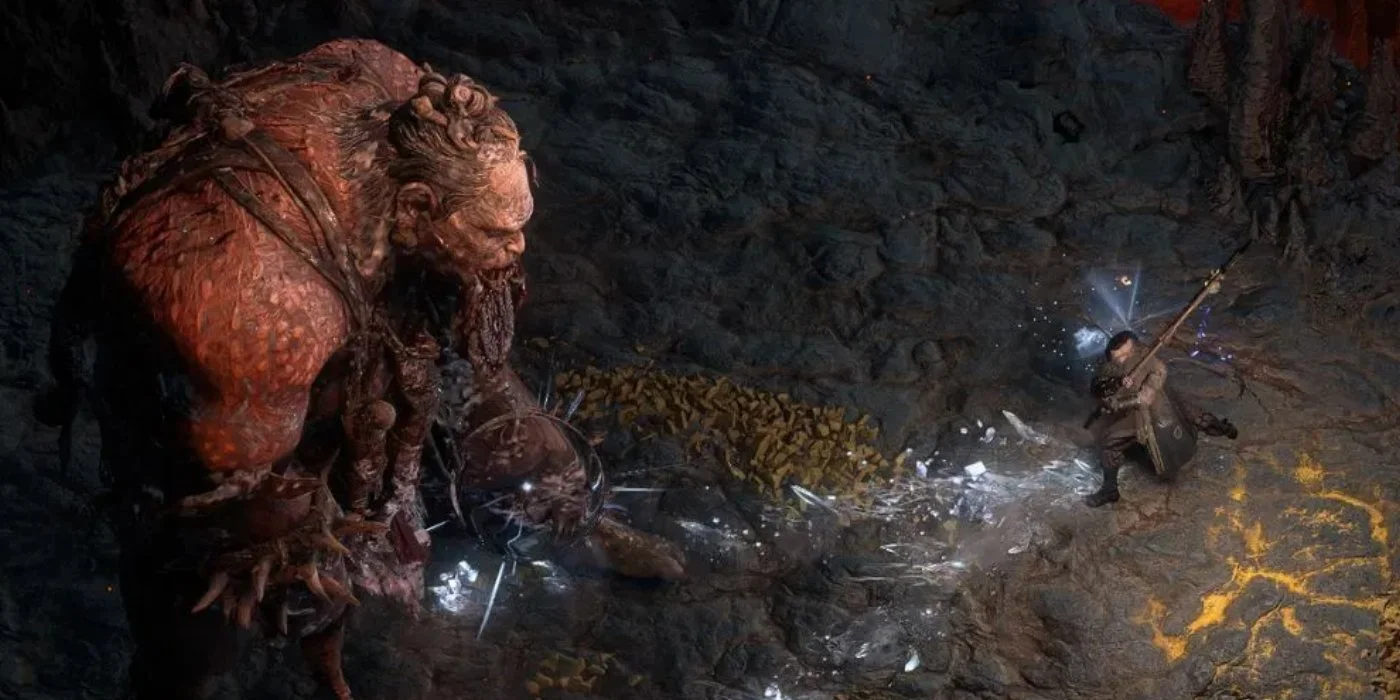
Update on July 28, 2026: NVIDIA has announced a new driver update (610.88). If you are on DirectX 12, and have been encountering freezes, you need to update your graphics drivers!
If Path of Exile 2 keeps hitching even though your FPS counter looks fine, the most common cause is shader compilation. The game builds shaders on the fly the first time it shows you a new skill effect, monster, or environment, and that causes a brief freeze. The other big culprits are asset streaming from a slow drive and network lag. The good news is all three are fixable, and most of it takes a few minutes.
What "Stuttering" Actually Means Here
Stutter isn't the same as low FPS. You can have a high average frame rate and still feel choppy because the time between frames is uneven. So before you start blaming your GPU, figure out which type of stutter you've got. There are basically three:
Shader/asset stutter - short freezes when something new appears on screen (a new skill, a new pack of mobs, a new zone). It tends to get better the longer you play a character because the cache fills up.
CPU/GPU stutter - consistent choppiness in busy areas with lots of effects, or right after a driver update.
Network stutter - rubber-banding, your character snapping back, mobs freezing then teleporting. This is lag, not graphics.
Knowing which one you have saves you a ton of wasted tweaking. If it only happens when the action gets crowded with players or monsters, look at the network section. If it happens the first time you see a new effect, it's shaders.
Fix No. 1: Sort Out Your Shader Cache
This is the single most important fix for most people, so do this even if you skip everything else.
Increase Your Shader Cache Size (NVIDIA)
The shader cache stores compiled shaders so the game doesn't have to rebuild them every time. Path of Exile 2 compiles shaders on the fly as you encounter new types of effects in the game world, which means stuttering every time you see a new skill, mob type, or environmental effect for the first time.
Open the NVIDIA Control Panel.
Go to Manage 3D Settings and then Global Settings.
Find Shader Cache Size and set it to 100 GB or Unlimited. It won't actually use that much space, it just removes the cap so the game stops evicting shaders it'll need again.
While you're in there, set Power Management Mode to Prefer Maximum Performance.
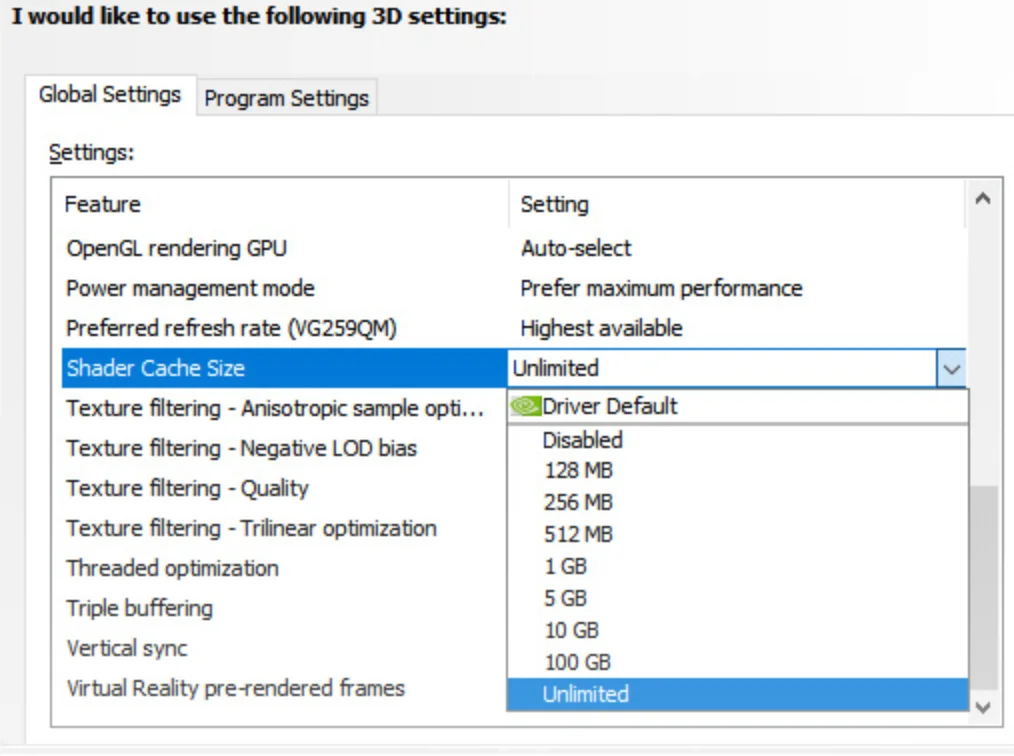
AMD users can do the equivalent in the Adrenalin software under the game profile's shader cache settings.
Keep the Game and Its Shader Cache on the Same Drive
Players have linked Path of Exile 2 stutter to the shader cache being on a different drive than the main install, because frequent calls for shader data overwhelm the slower drive, and the fix that has gained traction is to unify the location of the game and its shader cache. Putting them on the same fast SSD smooths this out. If you're moving the cache, the official PoE forums document a fix: move the shader cache to a faster drive by setting cache_directory in the [GENERAL] section of your config file, and increase the amount of shader cache available to your video card.
Delete Corrupt Shader Caches and Let Them Rebuild
If stutter started suddenly or after a patch, a corrupt cache can be the problem. Clearing it forces a clean rebuild.
Fully close Path of Exile 2.
Press Windows + R, type %appdata%, and hit Enter.
Open the Path of Exile folder and delete all ShaderCache folders from your PoE2 AppData folder.
Launch the game. Expect some stutter for the first session while it rebuilds, then it should settle down.
Fix No. 2: Try a Different Renderer
PoE2's default renderer is DirectX 12, and for most NVIDIA GPUs on current drivers, DX12 is stable, but for AMD users, Intel Arc users, and anyone who saw a crash or stutter spike after the Dawn of the Hunt update, a renderer mismatch is a high-probability cause that's easy to test.
In-game, go to Options, then Graphics, then Renderer.
Try Vulkan or DirectX 11 and see if the hitching calms down.
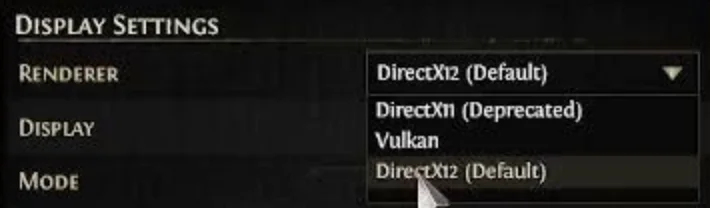
One trade-off worth knowing: Vulkan delivers 15-30% lower FPS than DX12 on some setups, but it can give smoother frame pacing. If the game feels better even at a slightly lower number, that's a win. If the game won't even launch, you can change the renderer in the config file before opening it.
Fix No. 3: Trim the Heaviest Graphics Settings
You don't need to gut your visuals. A few settings cause most of the GPU strain in crowded fights:
Turn on an upscaler. PoE2 supports modern upscalers and AMD's official FSR list includes Path of Exile 2, so try DLSS, FSR, or XeSS at a balanced mode first, then adjust, and if you see ghosting or shimmering that bothers you, switch the upscaler or raise the quality preset. Upscaling can reduce GPU load and smooth frame delivery.
Lower shadow and global illumination quality a notch. These are expensive and you barely notice the drop during fast gameplay.
Cap your frame rate slightly below your monitor's refresh rate. A steady capped frame rate often feels far smoother than an uncapped one that swings wildly.
Test frame generation carefully. It can boost the FPS number but sometimes adds latency or micro-stutter, so toggle it and judge by feel, not the counter.
Fix No. 4: Clean Up Your Drivers
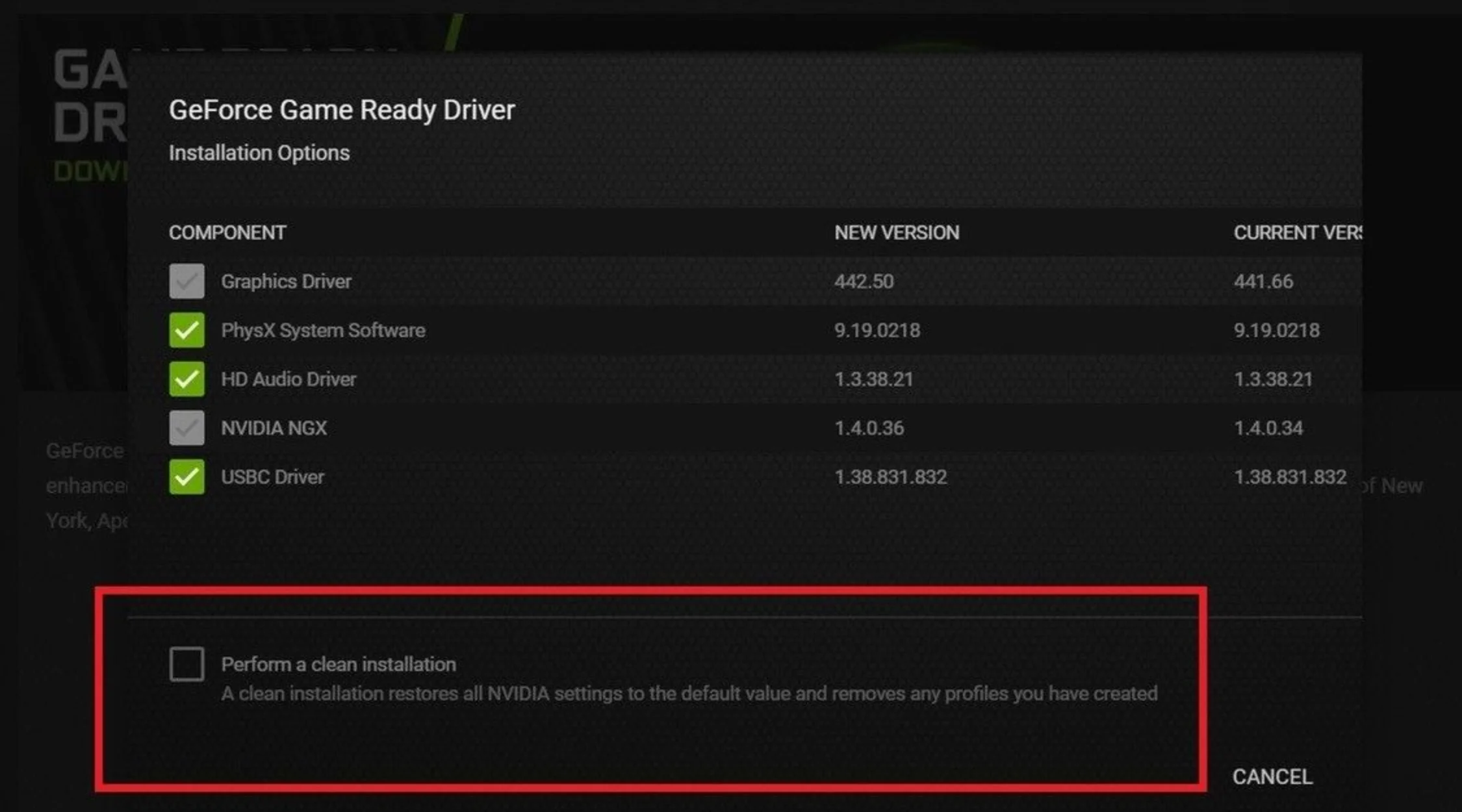
A bad or stacked-up driver install causes micro-stutter more often than people think. Install the latest Game Ready or Adrenalin driver, and consider a clean install if you've been upgrading over old versions. Sometimes a brand-new driver introduces micro-stutter or crashes, so if you noticed issues right after updating, roll back to your last known-good driver and retest.
Fix No. 5: Deal With Network Stutter
If your character snaps backward, mobs freeze then jump, or it only happens around other players, that's network lag rather than a graphics problem.
Unlike Path of Exile 1, Path of Exile 2 doesn't let you manually switch the network mode between Lockstep and Predictive, so instead, try restarting the entire client and resync to resolve the issue. What you can do:
Use the /resync command or restart the client to clear up desync.
Pick the gateway/server closest to you at login for the lowest ping. Players on distant gateways, especially the Korea and Japan gateways, have reported a frustrating wave of high ping and latency spikes.
Use a wired connection instead of Wi-Fi if you can. Lockstep mode relies on a fast internet connection, so a stable line matters.
Close background apps that hog bandwidth (cloud sync, streaming, big downloads).
A Quick Order to Try Things
Set your NVIDIA/AMD shader cache size to max and power mode to maximum performance.
Make sure the game and shader cache are on the same fast SSD.
Delete old shader caches and let them rebuild.
Update or clean-install GPU drivers.
Turn on an upscaler and cap your frame rate.
If it's still rough, swap the renderer and test.
If it's rubber-banding, fix your connection and gateway, not your graphics.
Work through them in order and you'll usually land the fix in the first two or three steps. Most Path of Exile 2 stutter traces back to shaders and storage, so that's where your time is best spent.
About_Author

Robert "Fluxflashor" Veitch is the founder of Out of Games. With over a decade of experience in gaming content, and being done with the exhaustion of corporate nonsense, he wanted to do something different with a focus on the community in this online world that tries so hard to just make everyone just another number. Robert is currently playing whatever interesting game shows up next. He can be contacted via direct messages.
More_Path of Exile 2_Guides
How to Juice the Untainted Paradise Map in Path of Exile 2
What Does Corrupted Mean in Path of Exile 2?
How to Get More Spirit in Path of Exile 2
Latest_Path of Exile 2_Guides
How to Juice the Untainted Paradise Map in Path of Exile 2
What Does Corrupted Mean in Path of Exile 2?
How to Get More Spirit in Path of Exile 2
// join_the_conversation
Sign in to share your thoughts, vote on comments, and connect with the community.
Comments
// no_comments_found
Be the first to share your thoughts!
Leave a Comment