



Thanks for this trick, the damn windowed mode was driving me crazy
Yu-Gi-Oh
How to Launch Yu-Gi-Oh Master Duel on Steam/PC in Fullscreen Automatically
Updated 4 years ago
by
Nirast
If you want to set Yu-Gi-Oh Master Duel to fullscreen on PC and Steam so you can play it with your whole monitor, we've got the solution for that pesky game setting that doesn't work.

If you're playing Yu-Gi-Oh Master Duel on Steam, you've likely ran into the issue of the game opening in Windowed mode, when you'd rather play in Fullscreen. Even if you set the game to Fullscreen from the game's settings, the next time you open it, it'll go back to Windowed. Well, we have a solution! ...Sorta.
You can set the game to open in Windowed Fullscreen. It's not true Fullscreen, as the game and other programs will still register as being in Windowed mode, but it'll completely get rid of borders, and it'll fill out the entire screen. Also, this might not work for everyone, especially Linux users.
How To Force the Game To Open in Fullscreen
The process is quite simple. In your Library, right-click on Yu-Gi-Oh Master Duel -> Properties -> Launch Options -> type the following line:
-popupwindow
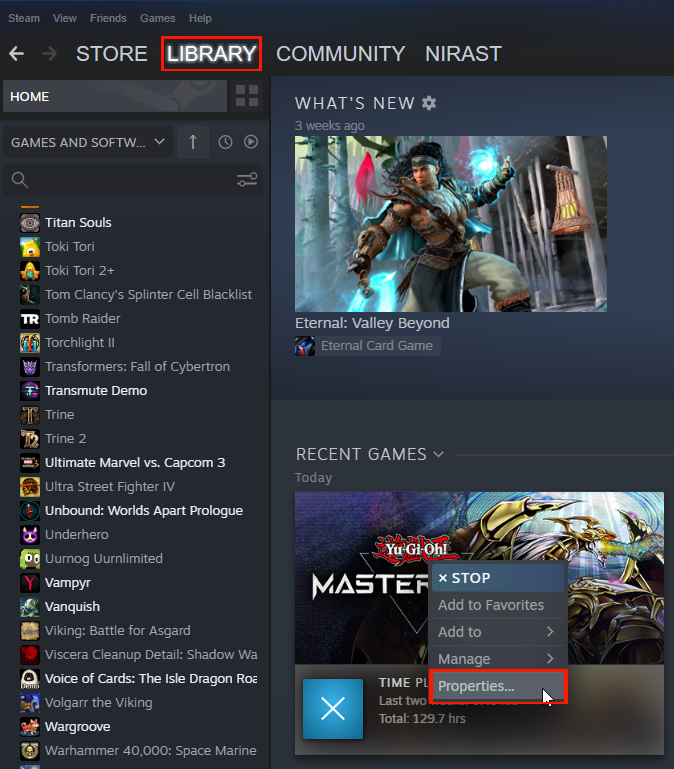
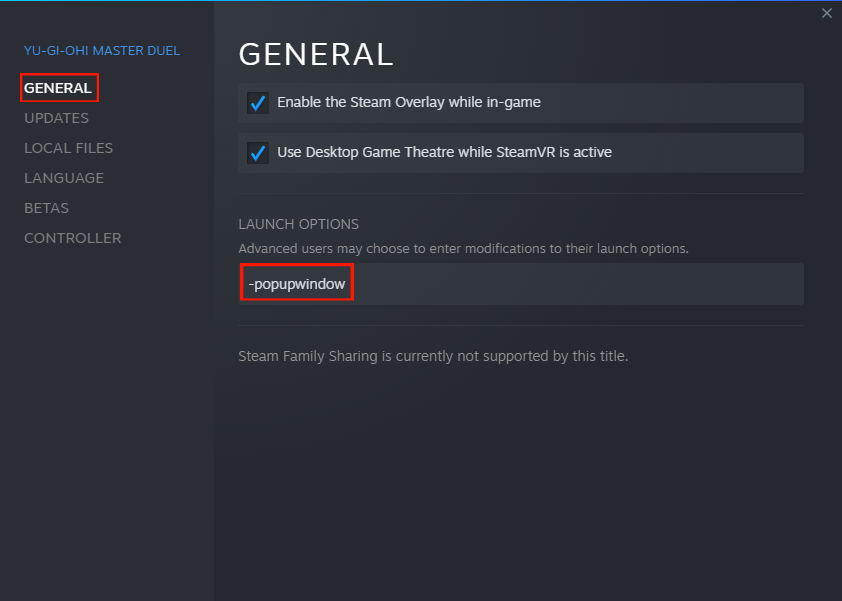
And that's about it! The next time you launch the game, and every time after that, it'll enter Windowed Fullscreen.
About_Author
Just a guy with opinions video games who decided to share it with everyone against their will :P. I specifically like single-player games and card games, though usually not what's most popular at the moment.
More_Yu-Gi-Oh_Guides
How Standard Rotations Work in Hearthstone - Year of the Scarab
UPD Mar 17, 2026
Top Money-Making Crops to Plant During Spring in Stardew Valley
UPD Dec 28, 2025
Leave a Comment