0
Hearthstone Posted by Created 5 years, 6 months ago Updated 4 years, 7 months ago
Card Reveal
10 comments 516 views

Way to use different portraits

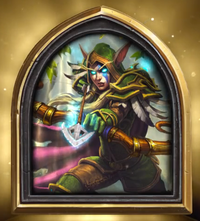
Wanted to know if there is any way to have different portraits for different decks of the same class. I don’t see any way to do it and if it’s that’s the case I’m against it.
Comments

  • Wanted to know if there is any way to have different portraits for different decks of the same class. I don’t see any way to do it and if it’s that’s the case I’m against it.

  • Just change the hero of that class, for that particular deck. It will change the portrait

  • If I understand correctly, you want to have f.e. portrait of Liadrin on your Mech Paladin deck and Arthas on your Pure Libram deck? If so, yes it is doable, just edit your existing deck and in your top right corner you can choose cardback and portrait for the deck, just choose one and press Done (if you don´t change it manualy for every deck, you get your "favourite hero" of the class as portrait by default.) You can do it with every deck you make. Hope it helps :)

    1. Go to "My Collection"
    2. Select deck you wish to change hero portrait on
    3. Open your portraits
    4. Select portrait you wish to assign
    5. profit
  • You can set a "favorite portrait" for each class, so that whenever you make a new deck, it's that portrait, but you can also change to portrait for each deck individually.

  • XARkkal pointed it out well

  • they should add random portrait just like they did with card backs. I got 4 extra shaman hero portrait that i never use

  • I'm now just discovering this and came here to share this information (albeit ten months too late). Carry on.

    • Quote From tcipps

      they should add random portrait just like they did with card backs. I got 4 extra shaman hero portrait that i never use

      Actually I really like this Idea, random portraits would be great, now more with all the tavern pass skins (Still saving for them T.T

    • Quote From Xarkkal
      1. Go to "My Collection"
      2. Select deck you wish to change hero portrait on
      3. Open your portraits
      4. Select portrait you wish to assign
      5. profit

      Instruction unclear - now my neighbours are mad - thank

Leave a Comment

You must be signed in to leave a comment. Sign in here.