

Hearthstone
How to Play Hearthstone With 60 or 144 FPS (Frames Per Second)
Hearthstone feeling like it isn't running perfectly smooth anymore? The reason might be due to Patch 23.2 introducing new graphical frame rate modes! Here's how you get the most out of your device.
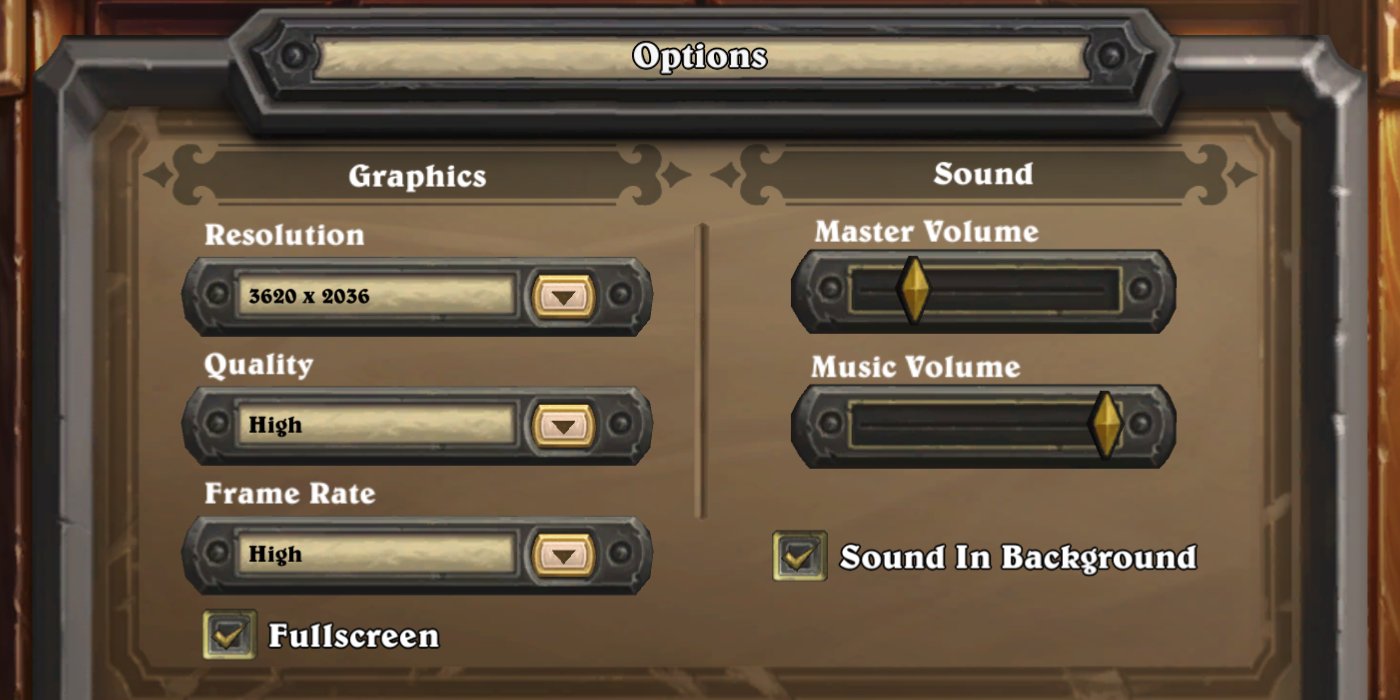
Hearthstone feeling like it isn't running perfectly smooth anymore? The reason might be due to Patch 23.2 introducing new graphical frame rate modes!
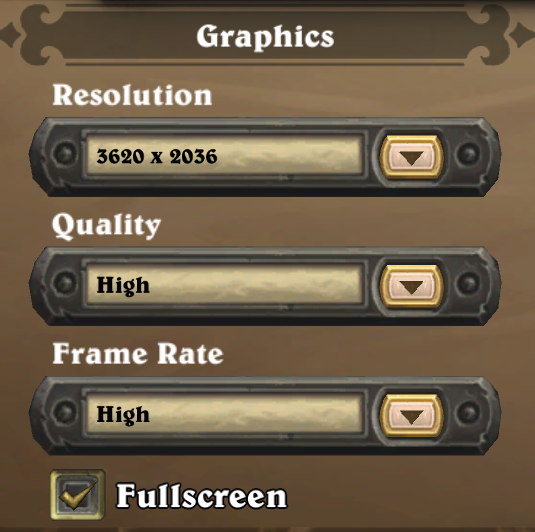
How to Change to 60 FPS
You're going to want to change your "Frame Rate" setting, which is a new setting in addition to the old "Quality" setting. Here are the values for most players.
- Low - 30 FPS
- Medium - 60 FPS
- High - 60 FPS
Important Notes
- Medium and High when on a Laptop on Battery Power will become 30 FPS.
- We've also seen some cases where Medium is 30 FPS, this seems to fix itself if you switch the option and go back to Medium.
- Low frame rate will dynamically switch to 60 FPS when you are dragging elements in-game.
What About 144 FPS? Even More?
If you've leveled up your game and have a 144hz monitor, or something even better, you'll be happy to know all you need to do is set your Frame Rate setting to "High" to take full advantage of your high refresh rate display.
- Low - 30 FPS
- Medium - 60 FPS
- High - 144 FPS (or the FPS of your monitor).
Blizzard has special code that checks your monitor's refresh rate so that Hearthstone will always match it when it is set to High.
Why Doesn't Blizzard Name These Options Better?
We don't know for certain, but Blizzard has stated over the years that they like to keep the options simple in Hearthstone. Many players may not know what frame rate even means so pushing numbers in their faces may make them confused. Generally speaking though, High is a graphical setting that more players should be accustomed to since it has been in the "Quality" section since the game has launched.
There's also more complexity involved in changing the High label dynamically based on display resolution for users with high refresh rates, and with the Medium and High settings getting toned down when you're on Battery power on a Touch device, this is something else that can't be as easily conveyed so keeping it to a simple Low, Medium, and High, makes life easier for players.
Historically Speaking
In the past, players that wanted Hearthstone to run at 60 FPS could manually edit client files to enable "targetframerate=60". This was especially a pain to do on mobile, and it would typically reset after patches or sometimes after restarting your game, so it's great to see Blizzard has finally leveled the client up and made this more accessible to all players - options are great!
About the Author

Robert "Fluxflashor" Veitch is the founder of Out of Games. With over a decade of experience in gaming content, and being done with the exhaustion of corporate nonsense, he wanted to do something different with a focus on the community in this online world that tries so hard to just make everyone just another number. Robert is currently playing whatever interesting game shows up next. He can be contacted via direct messages.
More Hearthstone Guides
Top Money-Making Crops to Plant During Spring in Stardew Valley
Steam Wallet Pending Balance? Here’s Why Your Sale Funds Are Delayed
How Standard Rotations Work in Hearthstone - Year of the Pegasus
Latest Hearthstone Guides
All Hearthstone Cards Revealed for Cataclysm Expansion

Comments
Im the only who thinks this is a stupid idea ?
edit: i mean in some modes like battlegrounds fps are important for quality games becouse animation make alot of difference , in miracle priest is the same , fps matters for how many cards you can play in a turn.
So i think is better play half games but better games , if one want long battery they can manual set options down , or blizzard can make a checkbox to enable disable battery savings
I agree, I think it should be on the user to decide if they want to sacrifice their battery juice in exchange for more FPS. I also understand though there is no perfect solution when Blizzard refuses to add proper settings to the game client, and defaulting to saving people battery life is probably the smart thing to do - Windows laptops just run horribly to begin.
Thank you for this article; I'm one of those who doesn't completely understand this.
I noticed my screen flickering & when I checked options, nothing was selected, so I choose high quality & it seems better.
Except I have a 60 Hz monitor, but the game keeps auto-resetting the framerate to "Low". No Medium setting available.
Not enjoying the brand-new screen tearing effects!
I was wondering why everything looked... odd why playing.
does it work for everyone on mobile? if I want to click High, it shows the language selection which is just underneath it, hmmm
Same problem here.
If you have a variable refresh rate smart phone screen (max 120 Hz) - does that translate to 120 FPS?
This should work but many phones even with a high refresh rate display default to capping your frames to 60, requiring an option change in your settings somewhere.
as far as I remember, the default on the phone is a maximum of 30 fps and on android this parameter can be edited in the game files.
I just checked my phone. there is a maximum of 120 fps.
So this must explain why my BG game animations were super slow yesterday...
does the speed of animation change with these setting?
this has nothing to do with the animation speed.
Frames Per Second. the smoothness of the image on the screen depends on this parameter. that's it.